

Just like we’ve seen with GameHub and GameNative, DroidDeck is quickly taking the community by storm. Not just because of the functionality that are provided, but also because of how often DroidDeck is being updated and the number of features being added. That brings us to the latest release, as DroidDeck v0.6.0 is now available to download from GitHub.
With v0.6.0, the headlining new feature is the “experimental” addition of Xbox and PC Game Pass within the app. Sign in with your Microsoft account, and after a few moments, all of your available games will populate. According to the release notes, the games are launched “through Proton or FEX from the Games tab or straight from Steam.
That’s not the only addition that DroidDeck now offers, as the developers also introduced an “itch.io store.” You’ll need to provide an itch.io API key in order to get this working, but once that’s done, you can just peruse the vast library of games right from DroidDeck.
There are actually quite a few new features found in v0.6.0, but there are also a few performance “improvements” that we wanted to call out:
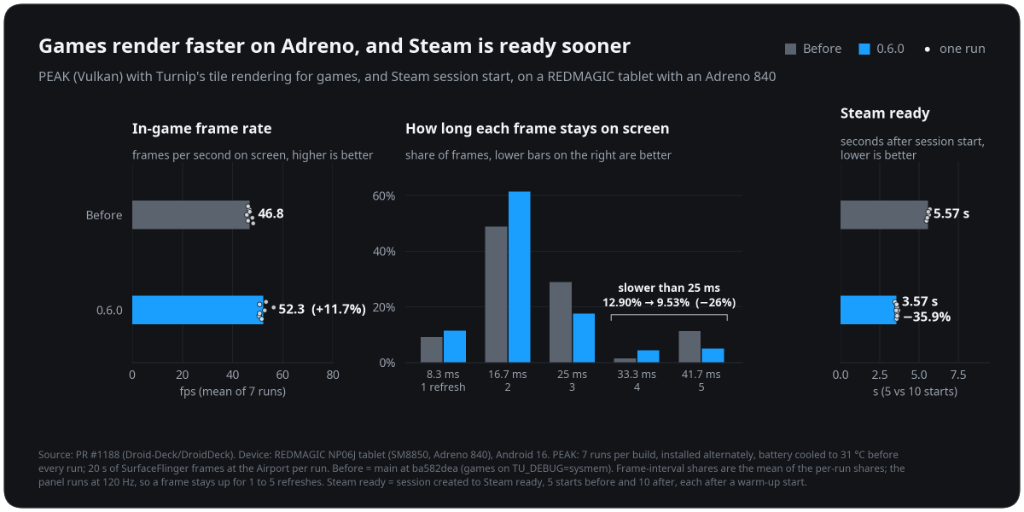
Faster games and session starts on Adreno. Games now use Turnip’s tile rendering while the Steam interface keeps system memory. In PEAK on an Adreno 840 tablet, the frame rate rose 11.7% and frames slower than 25 ms dropped by 26%. Steam is ready 35.9% sooner after a session starts (5.57 s to 3.57 s).
Faster game launches. Steam’s install-script step is skipped once it has finished for a game. In testing, Moonlighter went from 10.5 s to 7.7 s from Play to the game window. FEX’s file lookups skip proot, so Graveyard Keeper reaches its first scene 0.57 s sooner with 48% fewer proot stops.
Games on an SD card library load far faster. proot’s fast path now names files and follows links inside a library the same way proot does, instead of handing every lookup back to proot. In testing, Red Dead Redemption 2’s Story mode went from still loading after 16 minutes to the opening scene in about 2 minutes 10 seconds.
Seeing an almost 12% boost in frame rates, while also speeding up how long it takes Steam to launch are two very impressive upgrades. Arguably even more impressive is that v0.6.0 massively improved how long it takes for games to load when they are installed to a microSD card.
Going from waiting for more than 15 minutes to just over two minutes for RDR2 to load is just incredible. This is a massive improvement, especially for those who don’t want to fork out an extra $120 to get the 1TB Odin 3 Portal over the 512GB model, as you can just rely on a microSD card instead of internal storage.
It’s an exciting time for PC emulation on Android. Not just because of apps like DroidDeck and GameNative, but also because we’re beginning to see games natively ported to Android, which reduces a lot of the overhead from the translation layers. Take DroidDeck for a spin and let us know what you think!

- Added experimental Xbox and PC Game Pass as a store. Sign in with your Microsoft account to see your owned and Game Pass games, then download them with pause and resume, update, verify and manage add-on content. Games launch through Proton or FEX from the Games tab or straight from Steam. Search results open with their artwork and details, and Game Pass titles you have not installed yet can be installed from their page.
- Added an itch.io store. Sign in with your itch.io API key to see your library, then search the store or browse the newest, on-sale, free and top-rated shelves. DRM-free Windows builds install and launch through Steam like games from the other stores.
- Redesigned store pages. Each store has Library and Store tabs, and the library lists installed games first. A new capsule view shows portrait DVD-case art in every store. LB and RB switch between stores, and installed games get a Play button on their page. You can reorder and hide store tabs in the stores settings, and stores you are not signed in to are dimmed.
- Added configurable touchscreen gestures: taps, double taps, holds, one-, two- and three-finger drags and pinch zoom. Each one can be mapped to an action from a searchable list, with defaults and per-game overrides.
- Steam Remote Play from DroidDeck now streams video as well as audio and input. The picture is captured through PipeWire, as on SteamOS, and encoded by the phone’s hardware encoder. On a Thor that takes 7.3–8.0 ms per frame, down from 50–90 ms with software encoding. Touch on the client can tap and drag, and games are heard on the stream.
- Boot movies from SteamDeckRepo. Search SteamDeckRepo, filter by device and browse the Trending, Most downloaded, Most liked and Newest tabs, then install a movie and use it. Installed movies are listed with covers. Imported movies go into Steam’s own movie folder, and the sound has volume and length sliders.
- The performance HUD can show a colored frame-time graph and the battery temperature. Each part can be shown or hidden, and its colors and opacity can be changed.
- Added a custom Gradient theme, with primary and secondary colors chosen from a color wheel, sliders or a hex code, and a light app icon option.
- SteamVR controller types. Without VR controllers, the gamepad can act as Valve Index controllers (the default), Meta Quest 3 Touch Plus, HTC Vive wands, or a regular gamepad. The sticks move you in the game by default, and pressing both sticks switches them to moving the hands. The type can be changed while SteamVR runs. With glasses, the phone becomes a control panel with Recenter, the SteamVR menu, the keyboard, brightness and battery. Flat games started from VR open as a SteamVR panel.
- Added Rokid Max and Air glasses, with 3DoF head tracking, SBS modes, 120 Hz on the Max and brightness control, and experimental head tracking for VITURE Pro 2 without the vendor SDK.
- Easy Anti-Cheat games with an offline mode start without the anti-cheat bootstrapper. This is on by default and can be turned off per game. Online modes that need Easy Anti-Cheat stay unavailable.
- The built-in controller can be turned off (Steam settings > Controller > None), so a connected controller becomes player 1 for games that only read the first pad.
- On foldables, the unfolded controls can stay while a controller is connected, for players who use a telescopic controller and still want the trackpads and back buttons.
- The component manager offers nightly DXVK, VKD3D-Proton and FEX builds from DroidDeck-Components, with a Stable | Nightly switch on each row.
- When a game started from the Games tab closes, DroidDeck returns you to where you launched it instead of leaving you in Big Picture.
- Decky Loader installs from the upstream SteamDeckHomebrew release, has a Stable or Prerelease update channel, and shows Decky’s own third-party warning before a plugin ZIP is installed.
- Desktop mode can be uninstalled from beside Open desktop, including a desktop install that was interrupted. Games, Steam, added apps and settings are kept.
- GOG and Epic installs can use your language. The install dialog has a Game language choice, which follows the app’s language by default, and the stores settings can pin a default. GOG games no longer download only their English files.
- Games can be uninstalled or removed from their page in the Games tab. Store games use their store’s uninstaller. Steam games delete their install but keep their saves and Proton prefix. Added games only lose their shortcut, so their files stay.
