

Afterplay, a browser-accessible emulation platform that lets you play and sync your games from anywhere, has added something the retro gaming scene has been missing for a while: a proper storefront for brand new indie games built for classic hardware.
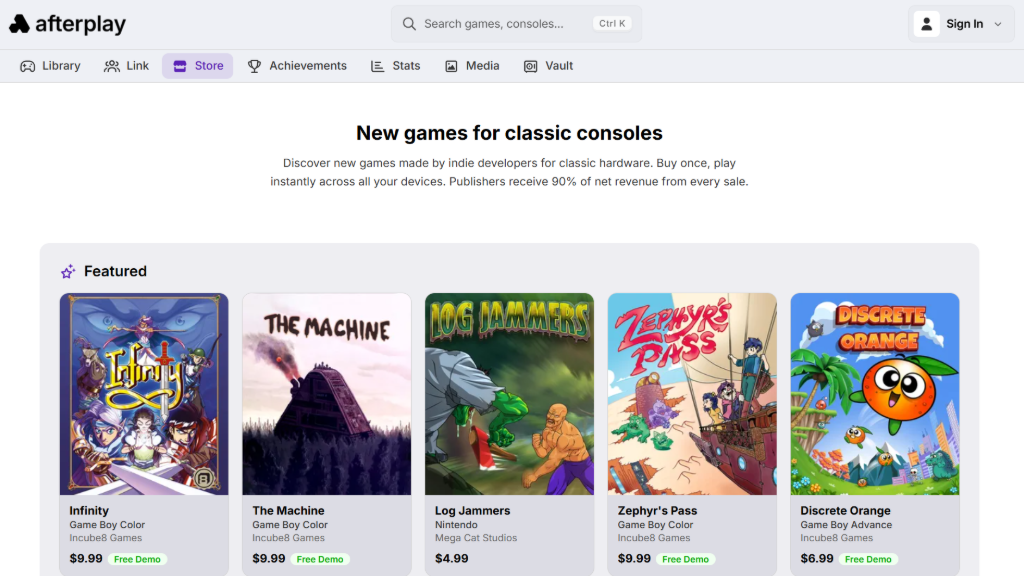
The new Afterplay store lets users purchase original homebrew titles directly from the desktop app or browser, with purchased games added to their collection and ready to play immediately through the relevant system emulator. Physical copies are available for select titles as well, for collectors who want something to put on a shelf.
For those unfamiliar with Afterplay itself, the platform combines the flexibility of a tool like Retroarch with a cleaner UI akin to Analogue. It supports cloud-synced saves, multiple save file slots, multiplayer functionality, and a premium tier that includes features like AI-assisted Japanese-to-English translation. The store is the newest addition to that lineup, and arguably the most significant one yet.
At launch, games from Incube8 and Mega Cat Studios are available to purchase, with a demo of the long-in-development Infinity also available as a free download. The selection already spans multiple platforms, including new GBA, Game Boy Color, and Sega Genesis titles, with GBA Jam entries like Discrete Orange among the games on offer. More studios and titles are described as coming soon.
The closest parallel in the retro space is the recent EmuDeck Store, bringing new games to specific pieces of hardware through a curated platform. What Afterplay is attempting is broader: a single storefront where you can buy legitimate new retro releases across multiple systems and play them immediately, without hunting down flash carts or separate storefronts. Whether the catalog grows fast enough to make it a go-to destination is the question worth watching, but the foundation is a genuinely useful one.
Source: Retro Dodo

8 Comments
Hi, um… You might want to check what Afterplay really is. Their misleading language makes it sound like they’re selling games (ROMs) but they are not. I came to know about them because of this article and I fell for it. Fortunately, no money was lost, but I almost gave them money for a ROM I wouldn’t have actually bought.
Well, there is a storefront now, where they are selling ROMs from indie publishers and game developers: https://afterplay.io/play/store
🤷
You can’t take the ROMs out of their app/website. You can’t “buy” a ROM there and put it in your RK3326 device or anywhere else. You would not call Netflix a “storefront”, right? I’m not blaming you nor RH, their language is misleading. My full explanation: https://www.youtube.com/watch?v=rU3S55Z85MI
Also, this site’s “Anti-Spam by CleanTalk” does not recognize my email… It did before, weird.
This is Patrick the creator of Afterplay. I saw your YouTube video 🙂
You can access your purchased game and other files, like the instruction booklet at the bottom of the store page after purchase. See the attached screenshot.
You can also access the game files by right-clicking the game card. Selecting Edit Content. Then scroll down to the end of the modal to the game files area and click download.
I wasn’t sure which one I should reply to… Weenyways, I made another video with your explanation and all: https://www.youtube.com/watch?v=0MKAVKDnlKM
With that, I might buy games from Afterplay; the “platform” side is really not for me. But there is an audience for it, that’s for sure.
Hi Patrick! I’ve posted a “brand new”, updated video including your comments and instructions: https://www.youtube.com/watch?v=0MKAVKDnlKM
I’ve also updated the previous video’s description, added a card and a pinned comment.
This is Patrick the creator of Afterplay.
You can access your purchased game and other files, like the instruction booklet at the bottom of the store page after purchase. See the attached screenshot.
You can also access the game files by right-clicking the game card. Selecting Edit Content. Then scroll down to the end of the modal to the game files area and click download.
This is Patrick the creator of Afterplay. I saw your YouTube video 🙂
You can access your purchased game and other files, like the instruction booklet at the bottom of the store page after purchase. See the attached screenshot.
You can also access the game files by right-clicking the game card. Selecting Edit Content. Then scroll down to the end of the modal to the game files area and click download.