

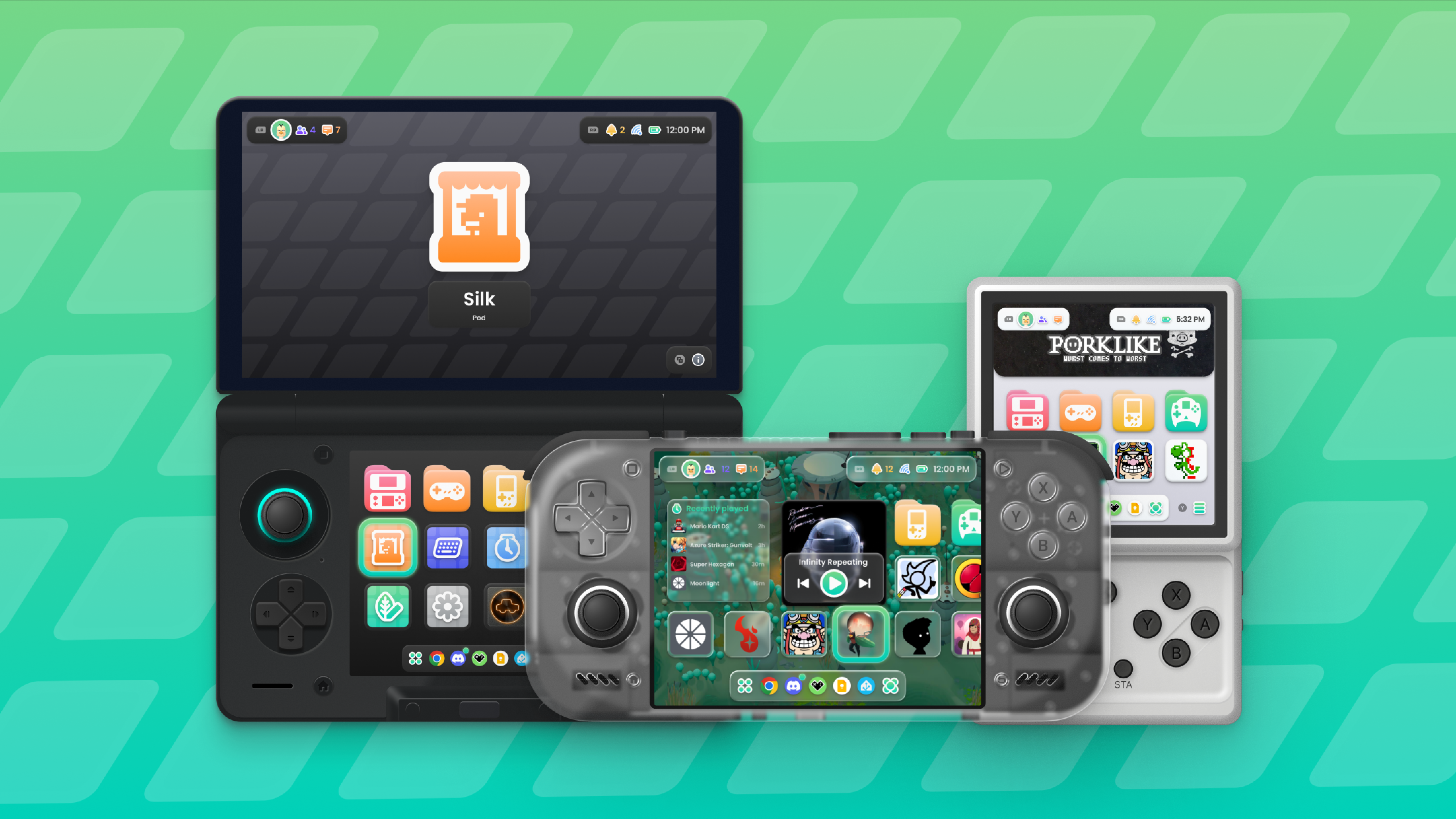
In case you haven’t been keeping up in the frontend scene over the last year, there’s been an explosion of front ends that aim to be good looking, functional, or just reminiscent of something from the days of physical media and potential ownership. Whether that’s known entities like Beacon and Console Launcher, or upcoming sleepers like Wave Launcher, we’re headed towards the land of a frontend for everyone. But right now at the forefront of playful aesthetics seems to be Cocoon Shell, and as of today, they’ve dropped their 3.0 release and it’s built from the ground up.
While normally I’d recommend checking out a Github page for all of the information about the latest drop, the Cocoon team has their own website that looks great just like their frontend. So if you want more information on what’s going on, I recommend you check things out there. As for some of the bigger features they’ve mentioned in the release you can find those provided down below.
Notes on Updates for Cocoon 3.0
- Project Metamorphosis is an overhaul that improves on UI, Functionality, and Design
- A New Home Screen for 3.0
- Game Icons are Larger, but still retain resizing abilities
- Pods now have home screen shortcuts for Log, Picnic, Silk, etc.
- Widgets are now viewable directly next to games.
- These can be placed directly into the games grid for further customization
- More Detailed Information Screen
- 120+ New Icons have been created and utilized in the latest update of Cocoon in 3 formats
- Colorful
- Accented
- Flat
- 120+ New Icons have been created and utilized in the latest update of Cocoon in 3 formats
- Information Screen features tabs for Game Info, Activity and Achievements
- Both RetroAchievements and Steam Achievements are viewable within Cocoon
- Status Panel is now utilized for general Android system toggles including Wifi Bluetooth and More with Notifications appearing there as well.
- The AYN Thor features a Single Screen Mode Toggle Now
- Social Panel now allows for Discord and Steam activity and messages for the prior and Android messages
- Cocoon now has single screen layouts in different formats including
- Standard Single Row
- Carousel
- Cover Flow to Show Off Artwork
- The RG Rotate Now features a Landscape view when closed
- External Display Docking is now a feature as well
- Four New Pods have been introduced as smaller apps within Cocoon 3.0
- Log – For Keeping track of playtime and Statistics
- Picnic – For managing screenshots and their organization.
- Silk – For Browsing themes and applying them to your system
- Settings – For… settings
- Themes from Silk will continue to work in Metamorphosis
- Glass Background has been added to allow higher visibility of the background if needed
- Scraping speed has been improved
- Launchbox, IGDB, and HowLongToBeat have been added as sources for Scraping
- ES-DE linking has been improved for both performance and overall usability
- Game sessions end after 30 seconds of inactivity with the use of Cocoon
- General Performance and Optimizations have been made to improve the usability of Cocoon on more devices.
Again, it’s quite a bit and if you want to know more you can always check out their website or join the Cocoon Discord. It’s awesome to see this team continue to work on and evolve the Cocoon Shell frontend into something way more fun and beautiful than what we could have though of for frontends in the past. Just like others, this one is definitely aiming to be a do it all frontend that you may never really have to leave. And I do hope it can manage that. For now though, we can see how things evolve.

2 Comments
While it looks good, it is starting to feel a bit bloated. It starts to feel that way, when you start adding a bunch of features that are not related to actually playing games.
I want a front end, and OS, for that matter, that is dead simple to understand, gets out of my way, and makes playing my games as simple as possible.
Cocoon, seems to be adding too many features. It almost feels like they are ramping up for a paid release, if that isn’t the case already. Which is fine. But, I don’t want all the extra fluff to tinker with.
I feel like a lot of people in this hobby, spend more time tinkering/collecting consoles, than actually playing and finishing games. Which is fine, but it ends up feeling more like an ADHD distraction, rather than enjoying the whole put of retro gaming, which is the gaming part. Like, you don’t ever actually end up playing games, or finishing them, because your device is in a constant state of fixing/updating.
While it looks good, it is starting to feel a bit bloated. It starts to feel that way, when you start adding a bunch of features that are not related to actually playing games.
I want a front end, and OS, for that matter, that is dead simple to understand, gets out of my way, and makes playing my games as simple as possible.
Cocoon, seems to be adding too many features. It almost feels like they are ramping up for a paid release, if that isn’t the case already. Which is fine. But, I don’t want all the extra fluff to tinker with.
I feel like a lot of people in this hobby, spend more time tinkering/collecting consoles, than actually playing and finishing games. Which is fine, but it ends up feeling more like an ADHD distraction, rather than enjoying the whole put of retro gaming, which is the gaming part. Like, you don’t ever actually end up playing games, or finishing them, because your device is in a constant state of fixing/updating.